In one sentence: PCA rotates your data onto new axes, ordered by how much variation each one captures, so a handful of axes can summarize thousands of genes.
\[C\,\mathbf{w}_k=\lambda_k\,\mathbf{w}_k \qquad\text{(principal component } \mathbf{w}_k\text{, variance } \lambda_k\text{)}\]
The video above and this walkthrough share one running example: blood cells profiled by single-cell RNA sequencing (the public PBMC 3k data set from 10x Genomics). The two-gene example is simulated for clarity; everything else is real data, and the code in section 10 reproduces every number.
1. Too many columns to look at
A single-cell experiment produces a table with one row per cell and one column per gene. After quality control, PBMC 3k has 2,638 cells and 13,714 genes. Nobody can look at 13,714 dimensions. But genes work in programs, so many columns rise and fall together. PCA finds those shared directions and lets a few of them stand in for the whole table.
2. Two genes, one cloud
Start with just two genes in 60 cells: CD3E, a T-cell gene, and LYZ, a monocyte gene. Each cell becomes a point. T cells and monocytes form two clumps, and the two genes are anti-correlated (\(r=-0.87\)): when one is high, the other tends to be low.
The first step of PCA is to center the data by subtracting each gene’s average (here 1.52 for both), so that the cloud sits around the origin:
\[\tilde{X}=X-\mathbf{1}\,\boldsymbol{\mu}^{\top}\]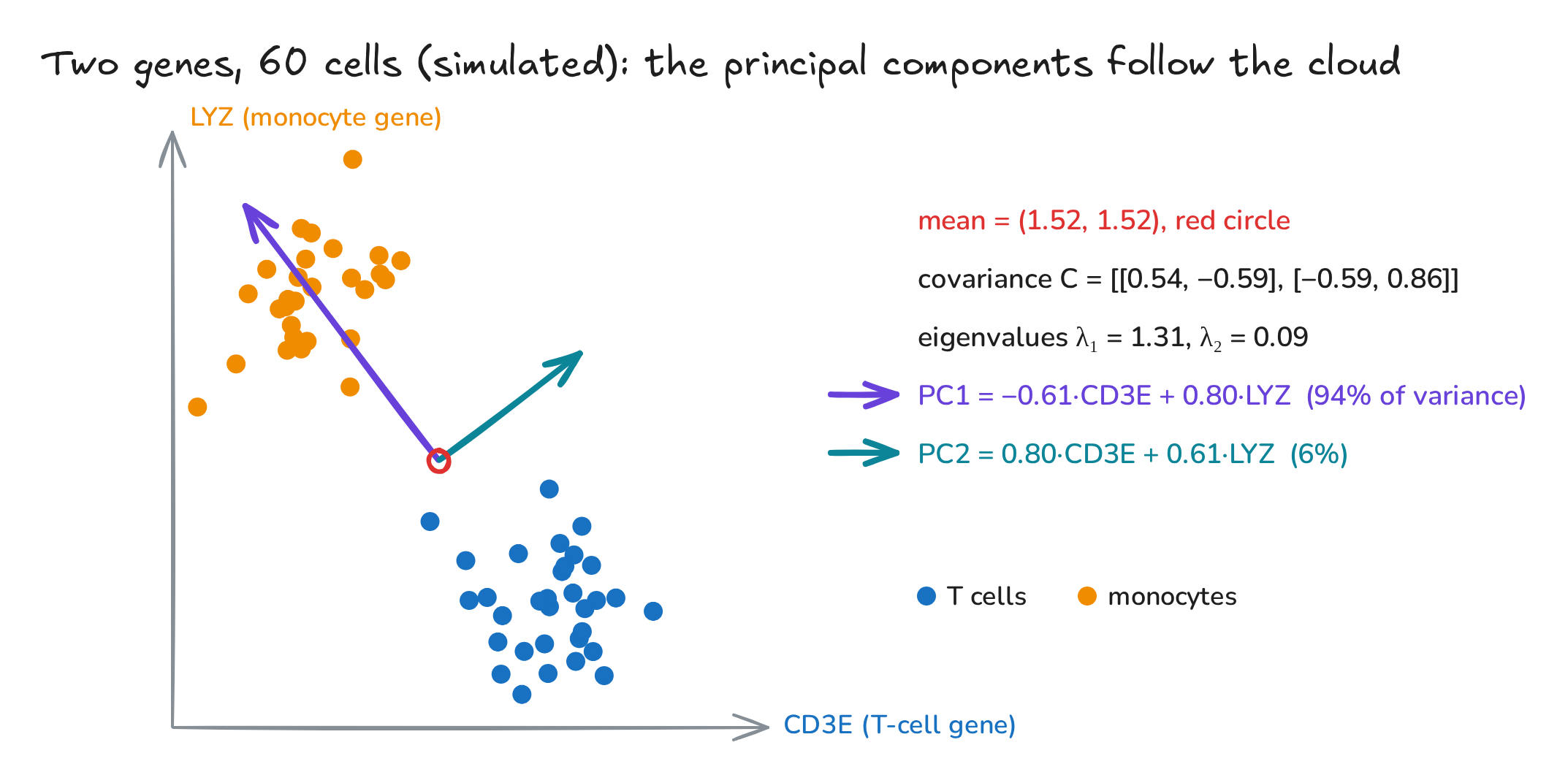
Fig. 1. Two genes, 60 simulated cells, and their principal components
3. Spin a line: the direction of most variance
Draw a line through the center and drop every cell onto it, like a shadow. The spread of that shadow is the variance along the line, and it changes as the line spins. At one angle it is as wide as it gets: 94% of all the variation lies along this single direction, the first principal component (PC1). The second (PC2) is perpendicular to it and picks up the remaining 6%.
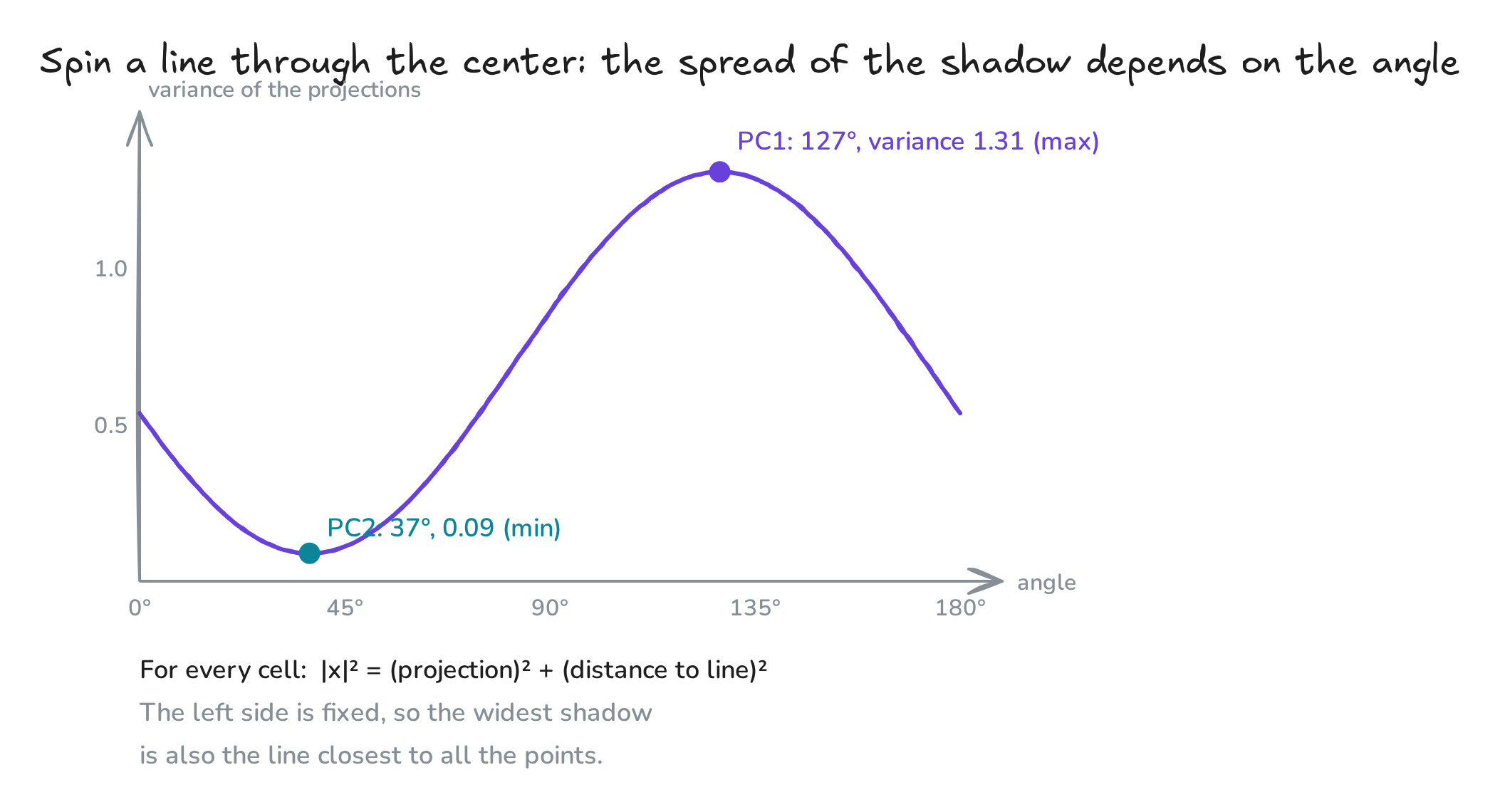
Fig. 2. Variance of the projections as the line spins
Maximizing the spread is the same as finding the best-fitting line. For every centered cell,
\[\lVert\tilde{\mathbf{x}}\rVert^{2}=(\tilde{\mathbf{x}}^{\top}\mathbf{w})^{2}+d^{2},\]where \(d\) is the cell’s distance to the line. The left side does not depend on the line, so the widest shadow is also the line with the smallest squared distances to all the points.
4. The math in three lines
- Covariance matrix, how much each pair of genes varies together: \(C=\frac{1}{n-1}\tilde{X}^{\top}\tilde{X}\). For our two genes, \(C=\begin{pmatrix}0.54&-0.59\\-0.59&0.86\end{pmatrix}\).
- Eigenvectors of \(C\) are the principal components, and each eigenvalue is the variance along its component: \(C\mathbf{w}_k=\lambda_k\mathbf{w}_k\), with \(\lambda_1=1.31\) and \(\lambda_2=0.09\). PC1 therefore explains \(1.31/(1.31+0.09)=94\%\). Equivalently, PC1 is the unit vector that maximizes \(\mathbf{w}^{\top}C\mathbf{w}\).
- Scores are each cell’s coordinates on the new axes: \(Z=\tilde{X}W\).
In practice, software computes the singular value decomposition \(\tilde{X}=U\Sigma V^{\top}\). It gives the same components (\(W=V\)) and variances (\(\lambda_k=\sigma_k^2/(n-1)\)) without ever forming \(C\), which is faster and numerically safer.
5. A recipe of genes: loadings and scores
Each component is a weighted recipe of genes:
\[\mathrm{PC1}=-0.61\cdot\mathrm{CD3E}+0.80\cdot\mathrm{LYZ}\]The weights are the loadings; a cell’s value on the component is its score. A high PC1 score means monocyte-like, a low one T-cell-like. With thousands of genes, the top loadings tell you which biology a component captures.
6. Real cells: 1,838 genes
The standard workflow normalizes each cell to the same total counts, log-transforms, keeps the 1,838 most variable genes, and scales each gene to mean 0 and variance 1. Then PCA. No cell-type labels go in, yet the first two components already sort the blood:
- PC1 splits myeloid cells from lymphocytes. Top positive loadings: CST3, TYROBP, LST1, AIF1, FCN1. Top negative: PTPRCAP, IL32, LTB.
- PC2 pulls cytotoxic NK cells (NKG7, GZMB, PRF1) away from B cells (CD79A, MS4A1, TCL1A).
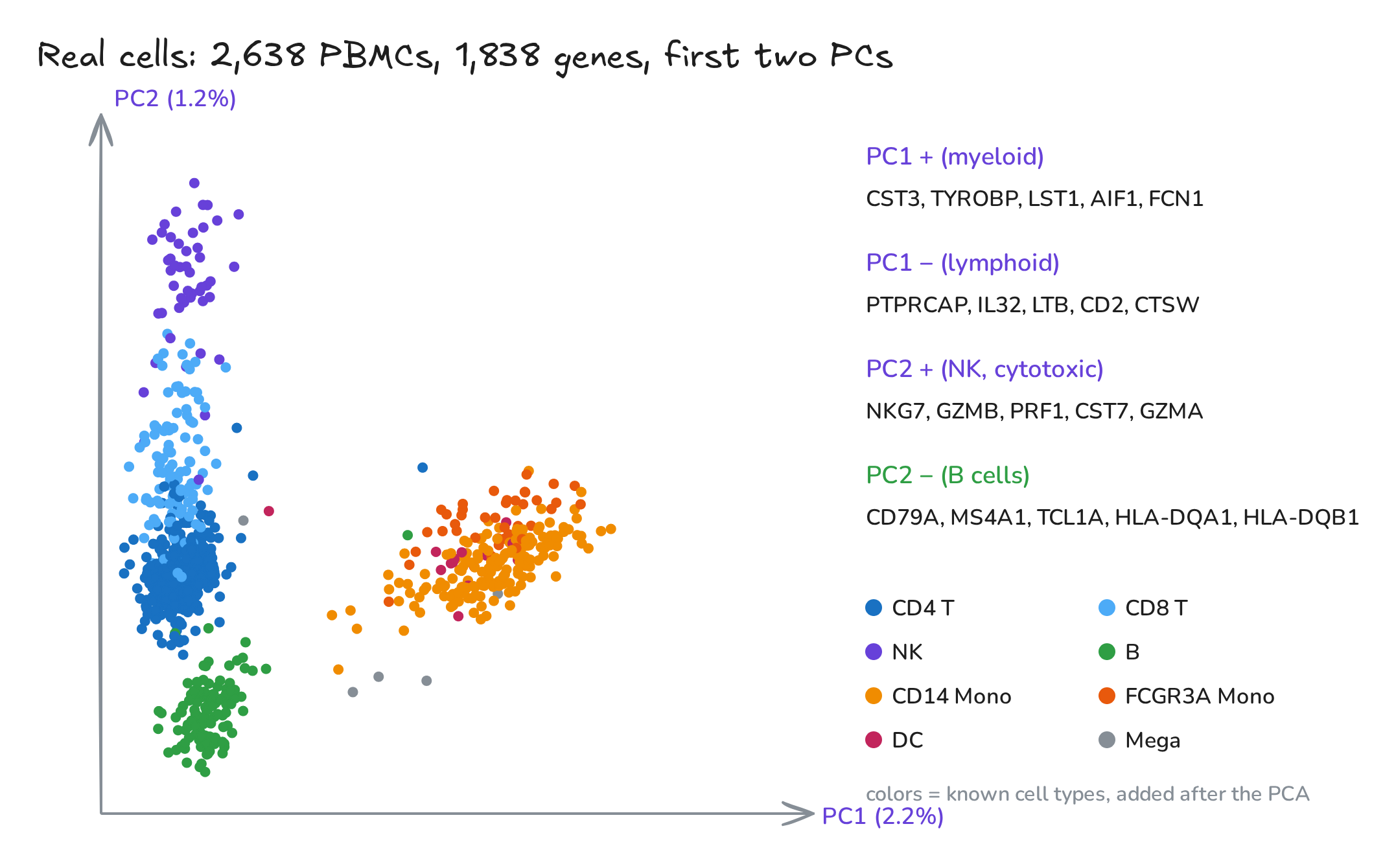
Fig. 3. PBMC 3k on its first two principal components
7. How many PCs?
Plot the variance each component explains. In single-cell data each one explains only a few percent (PC1 2.2%, the first 10 together 6.8%, the first 50 together 13.7%), because much of the variation in sparse counts is technical noise. The curve drops fast and flattens after about six components. Beyond this elbow lies mostly noise, so pipelines typically keep the first 10 to 50 PCs.
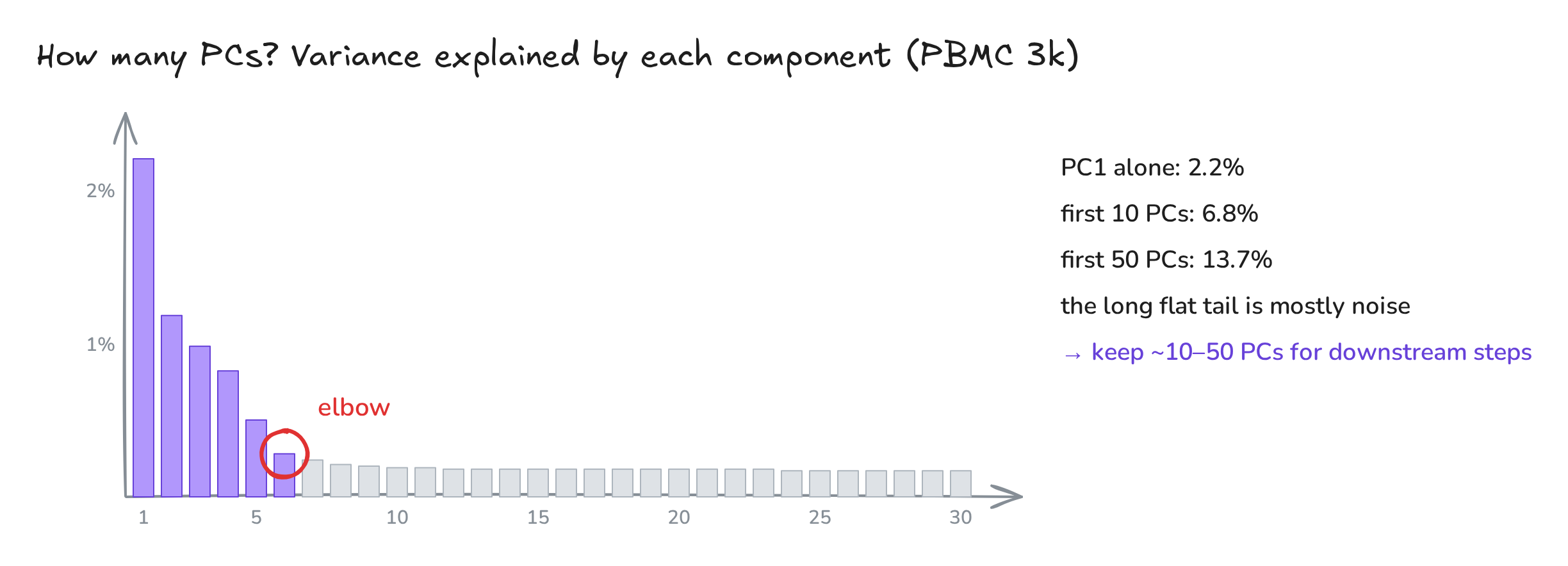
Fig. 4. Scree plot
8. PCA in machine learning
PCA is a workhorse far beyond biology. It compresses features, so models train faster and overfit less. It denoises, by dropping the low-variance tail. And it decorrelates: the scores on different components are uncorrelated (divide each by \(\sqrt{\lambda_k}\) and you have “whitened” features). One rule: fit PCA on the training data only, then apply the fitted rotation to the test data; fitting on everything lets information leak from the test set.
9. Beyond straight lines: t-SNE and UMAP
PCA can only rotate and project, so it is linear: curved structure, such as a differentiation trajectory, can fold onto itself. t-SNE keeps each cell’s nearest neighbors close by matching neighbor probabilities in the data (\(P\)) and on the map (\(Q\)):
\[\mathrm{KL}(P\,\|\,Q)=\sum_{i\neq j}p_{ij}\log\frac{p_{ij}}{q_{ij}}\]UMAP builds a similar (fuzzy) neighbor graph and lays it out fast, often keeping more of the global layout. In single-cell analysis the three work as a team: PCA first, down to 40–50 clean dimensions; then a neighbor graph, which is where clusters are found; then t-SNE or UMAP to draw the picture.
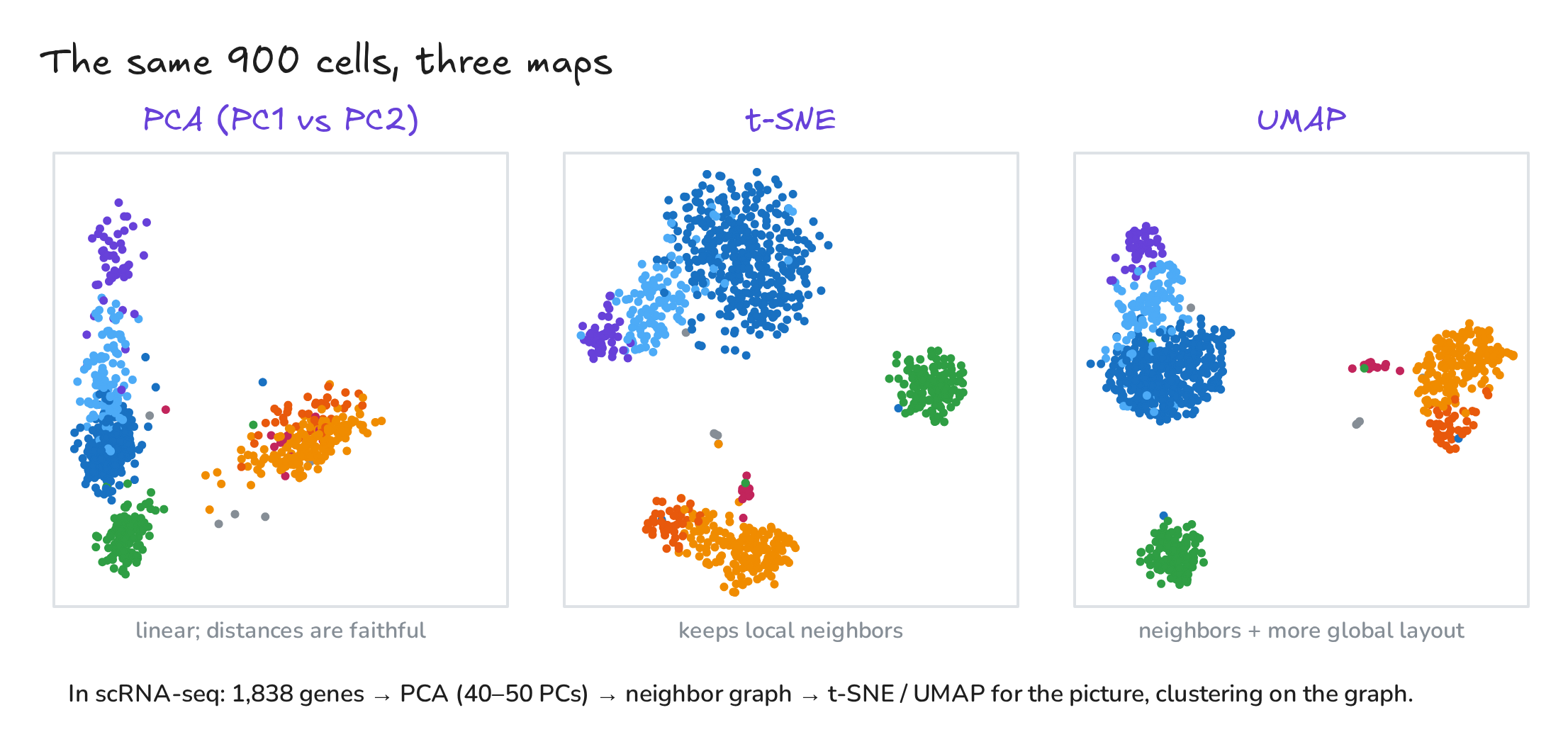
Fig. 5. The same cells, three maps
10. Build it yourself
PCA from scratch on the two-gene toy, checked against scikit-learn:
"""PCA from scratch on a two-gene toy (simulated T cells vs monocytes), checked against scikit-learn."""
import numpy as np

rng = np.random.default_rng(7)
T = np.c_[rng.normal(2.3, 0.33, 32), rng.normal(0.7, 0.33, 32)]   # (CD3E, LYZ) in 32 T cells
M = np.c_[rng.normal(0.8, 0.33, 28), rng.normal(2.5, 0.33, 28)]   # ... and 28 monocytes
X = np.vstack([T, M])                                             # 60 cells x 2 genes

# 1. center: subtract each gene's mean
mu = X.mean(axis=0)
Xc = X - mu

# 2. covariance matrix: how each pair of genes varies together
C = Xc.T @ Xc / (len(X) - 1)

# 3. eigenvectors = principal components, eigenvalues = variance along them
lam, W = np.linalg.eigh(C)                 # eigh: for symmetric matrices, ascending order
order = np.argsort(lam)[::-1]
lam, W = lam[order], W[:, order]
W *= np.sign(W[1])                         # sign is arbitrary; make LYZ's weight positive

Z = Xc @ W                                 # scores: each cell's new coordinates
print("mean:", mu.round(2))
print("covariance:\n", C.round(3))
print("eigenvalues:", lam.round(3), " explained:", (lam / lam.sum()).round(3))
print("PC1 loadings (CD3E, LYZ):", W[:, 0].round(2))
print("variance of the scores:", Z.var(axis=0, ddof=1).round(3))

# 4. same answer from the SVD of the centered data (what software actually does)
U, s, Vt = np.linalg.svd(Xc, full_matrices=False)
print("SVD eigenvalues:", (s**2 / (len(X) - 1)).round(3))

# 5. check against scikit-learn
from sklearn.decomposition import PCA
pca = PCA(n_components=2).fit(X)
print("sklearn explained ratio:", pca.explained_variance_ratio_.round(3))
mean: [1.52 1.52]
covariance:
 [[ 0.536 -0.587]
 [-0.587  0.859]]
eigenvalues: [1.306 0.089]  explained: [0.936 0.064]
PC1 loadings (CD3E, LYZ): [-0.61  0.8 ]
variance of the scores: [1.306 0.089]
SVD eigenvalues: [1.306 0.089]
sklearn explained ratio: [0.936 0.064]
The real workflow with scanpy (pip install scanpy), which produced Figs. 3 to 5:
"""PCA on real single-cell data: PBMC 3k (10x Genomics) with scanpy's standard workflow."""
import numpy as np, scanpy as sc

adata = sc.datasets.pbmc3k()                                   # 2,700 cells x 32,738 genes (raw counts)
sc.pp.filter_cells(adata, min_genes=200)
sc.pp.filter_genes(adata, min_cells=3)
adata.var["mt"] = adata.var_names.str.startswith("MT-")
sc.pp.calculate_qc_metrics(adata, qc_vars=["mt"], percent_top=None, log1p=False, inplace=True)
adata = adata[(adata.obs.n_genes_by_counts < 2500) & (adata.obs.pct_counts_mt < 5)].copy()
sc.pp.normalize_total(adata, target_sum=1e4)                    # same total counts per cell
sc.pp.log1p(adata)                                              # log(1 + x)
sc.pp.highly_variable_genes(adata, min_mean=0.0125, max_mean=3, min_disp=0.5)
adata = adata[:, adata.var.highly_variable].copy()              # keep the informative genes
sc.pp.scale(adata, max_value=10)                                # center and scale each gene
sc.pp.pca(adata, n_comps=50, svd_solver="arpack", random_state=0)
print("cells x genes:", adata.shape)

vr = adata.uns["pca"]["variance_ratio"]
print("PC1-5 explain (%):", (100 * vr[:5]).round(2))
print("first 10 / 50 PCs explain (%):", round(100 * vr[:10].sum(), 1), "/", round(100 * vr.sum(), 1))
genes = adata.var_names
for k in (0, 1):
    w = adata.varm["PCs"][:, k]
    print(f"PC{k + 1} top +:", list(genes[np.argsort(w)[::-1][:5]]), " top -:", list(genes[np.argsort(w)[:5]]))

sc.pp.neighbors(adata, n_neighbors=10, n_pcs=40, random_state=0)   # kNN graph built on 40 PCs
sc.tl.umap(adata, random_state=0)
sc.tl.tsne(adata, n_pcs=40, random_state=0)
print("embeddings:", adata.obsm["X_pca"].shape, adata.obsm["X_tsne"].shape, adata.obsm["X_umap"].shape)
cells x genes: (2638, 1838)
PC1-5 explain (%): [2.2  1.18 0.98 0.82 0.5 ]
first 10 / 50 PCs explain (%): 6.8 / 13.7
PC1 top +: ['CST3', 'TYROBP', 'LST1', 'AIF1', 'FCN1']  top -: ['PTPRCAP', 'IL32', 'LTB', 'CD2', 'CTSW']
PC2 top +: ['NKG7', 'GZMB', 'PRF1', 'CST7', 'GZMA']  top -: ['CD79A', 'MS4A1', 'TCL1A', 'HLA-DQA1', 'HLA-DQB1']
embeddings: (2638, 50) (2638, 2) (2638, 2)
11. Four traps
| Myth | Truth |
|---|---|
| PCA works on any raw numbers. | Center, and usually scale. Otherwise the most highly expressed genes dominate. |
| Each PC is a cell type. | PCs are directions of variance. They can also capture sequencing depth, batch or the cell cycle. |
| High variance means important. | Not always: a rare cell type can hide in a low-variance component. |
| Distances on a UMAP are meaningful. | Cluster sizes and gaps between clusters are unreliable. Use it to look, not to measure. |
The two-gene data in Figs. 1 and 2 are simulated. The PBMC 3k analysis follows the standard scanpy tutorial except for its optional regression step, so its numbers differ slightly from the tutorial’s; cell-type colors come from the tutorial’s annotated clusters and were added after the PCA. Figures were drawn with Excalidraw; the editable sources open directly on excalidraw.com: Fig. 1, Fig. 2, Fig. 3, Fig. 4, Fig. 5. The video was animated with Remotion and narrated with a synthetic (text-to-speech) voice. Music: “Deliberate Thought” by Kevin MacLeod (incompetech.com), licensed under CC BY 4.0.